Learn about provider-specific instructions required for initial integration setup and deductions setup.
Before setting up any integration through Finch, review the provider’s setup requirements below — not all providers require additional setup, only those listed here.
To connect to AlphaStaff, employers provide their 6-digit Client ID in Finch Connect.After providing this, the employer receives a notification from AlphaStaff within 7 business days confirming Finch’s access to their data. Once confirmed, Finch can start fetching data for the employer. During this setup period, any requests to the Finch API using the employer’s access tokens return a 202 response with the message “Authorization to this company’s data is pending”.If an employer does not know their Client ID, they can contact AlphaStaff to retrieve it.
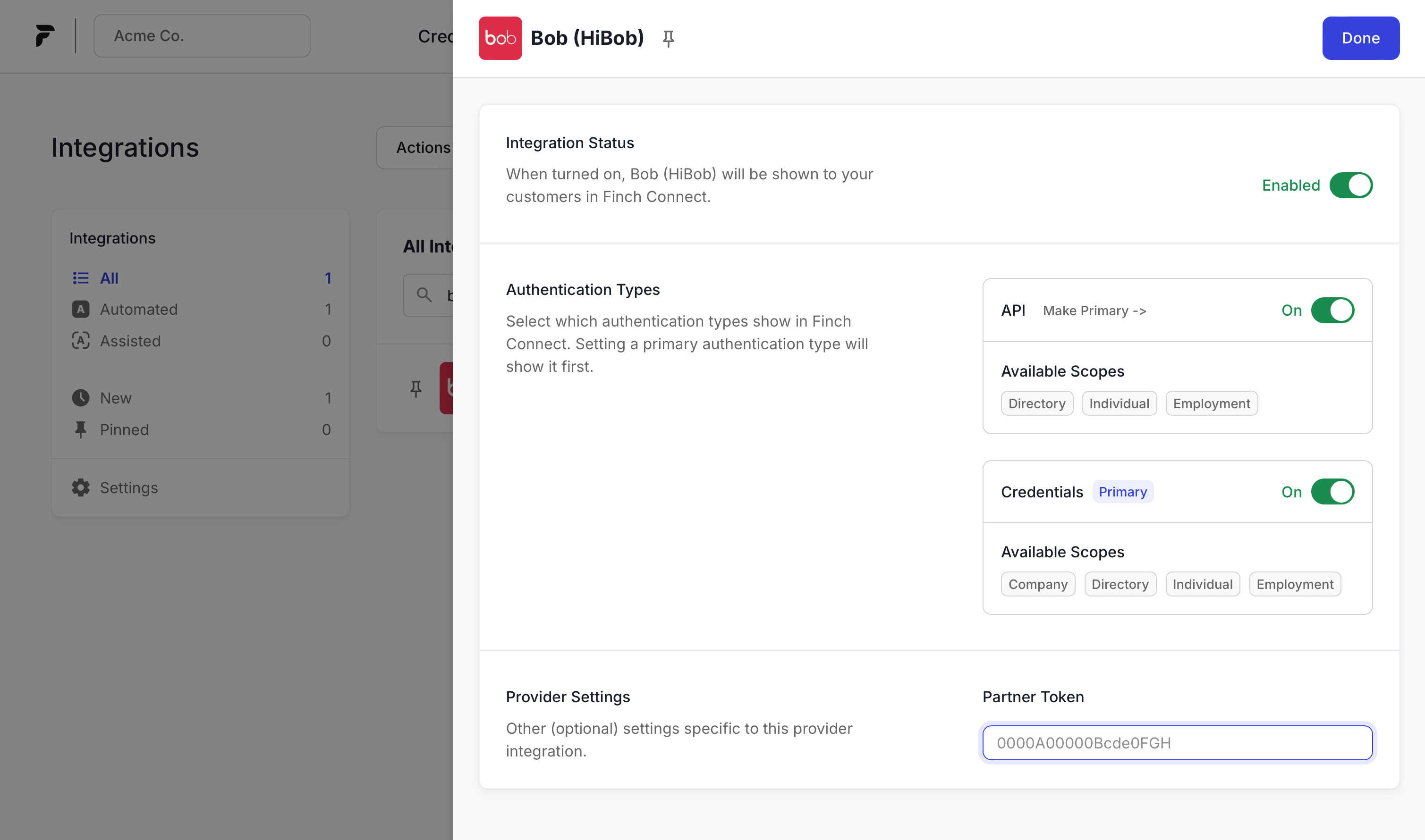
If you have a direct partnership with Bob, provide your Partner Token to Finch so Finch can use that token when sending requests to Bob on your behalf. You can do this directly in the Client Dashboard by going to Integrations, selecting Bob, and providing the value in the Partner Token field.Being a partner does not change your integration or usage with Finch — this requirement lets Bob track requests it receives on behalf of its direct partners.
To integrate with Deel, create a Deel account and OAuth application, then connect your Deel OAuth application to Finch. See the Deel Onboarding Guide for detailed instructions.
To integrate with Factorial, create a Factorial account and OAuth application, then connect your Factorial OAuth application to Finch. See the Factorial Onboarding Guide for detailed instructions.
Gusto requires a one-time security review before you can access their production API. Finch first vets your security requirements, then provides you with Gusto’s security questionnaire to complete. Gusto’s review typically takes 2–4 weeks, plus any additional time for follow-up requests from Gusto.Follow the Gusto Onboarding Guide for the full process, including creating a Gusto Developer Portal account. You’ll also be asked to agree to Gusto’s Terms of Service.
Paylocity connections start in the Paylocity Marketplace. For each application Paylocity approves, Paylocity lists a tile named <Your application> via Finch, and Finch holds the Paylocity credentials for that tile. When an employer requests your tile, Finch redirects them to your application with a Finch Connect session, and your application launches Finch Connect to finish the connection.Follow the Paylocity Onboarding Guide to set up your tile and handle the redirect from Finch. Contact your Developer Success Engineer to confirm whether Paylocity has approved your application.
Enabling a Rippling integration requires an onboarding process that includes a review by Rippling for eligibility to become a Rippling partner. Finch submits the application on your behalf and keeps you updated. See the Rippling Setup Guide for Developers for more information.Employers need the Identity & Access Management package for Finch to retrieve data from Rippling.
TriNet requires a one-time security review before you can integrate.
Start the review. Contact your Implementation Engineer or email implementation-team@tryfinch.com to initiate the TriNet security review with Finch.
Complete the field validation spreadsheet. Finch shares a field validation spreadsheet — fill it out and notify your Implementation Engineer or Finch Technical Support when it’s done.
Wait for TriNet’s approval. Finch submits the review to TriNet. Once TriNet approves it, your application appears in their integration center.
Connect employers. Employers can now authenticate with TriNet by following the directions in Finch Connect.
A handful of Workday department fields can be made available upon request. See our field support for all fields supported by default.For Company data, departments[].source_id is populated with the IDs of the Workday supervisory organizations for the company and is available upon request. departments[].name is available for the company by default.For Directory data, department.source_id is populated with the ID of Workday supervisory organization for the worker and is available upon request. department.name is available for the worker by default.For Employment data, department.name is populated with the name of the Workday supervisory organization for the worker and is available by default.
The description field for new Deductions in Justworks must be under 30 characters. Finch’s Create Deduction endpoint returns an error if the description exceeds that limit.
Before enabling Deductions for Paychex, confirm that each employer has configured their benefits appropriately in their Paychex account. See our instructions for employers to configure their Paychex deductions.
Paychex has a 20-character limit for Component Type Description.
To create or edit any employee benefits in TriNet, the employer must contact TriNet directly — the TriNet API can’t accommodate creating or editing employer-wide benefits. Employers instead submit a Retirement Plan Summary Setup Form with TriNet’s retirement team at least 12 days before the first pay date where a deduction would apply.Finch currently supports 401k and 401k Roth retirement savings plans. Once the benefit is created, Finch can enroll users into the benefit automatically. TriNet does not support custom_pre_tax or custom_post_tax deductions and contributions.
To enroll an individual in a Roth 401(k) with employer match, QuickBooks requires this approach since match isn’t supported on the Roth 401(k) enrollment directly:
Create a traditional 401(k) enrollment alongside the Roth enrollment
Set the employee deduction amount to $0 on the traditional enrollment
Configure the intended employer match amount as the contribution value on this traditional enrollment
Was this page helpful?
{"docsConfig":{"theme":"mint","$schema":"https://mintlify.com/docs.json","name":"Finch","colors":{"primary":"#161616","light":"#FAFAFA","dark":"#3E4AE7"},"logo":{"light":"https://mintcdn.com/finch/ejF2Kw2CeeMQKCJw/logo/logo-black.svg?fit=max\u0026auto=format\u0026n=ejF2Kw2CeeMQKCJw\u0026q=85\u0026s=e490dba98fb7b16e8f9f5ab4a9a58a5c","dark":"https://mintcdn.com/finch/ejF2Kw2CeeMQKCJw/logo/logo-white.svg?fit=max\u0026auto=format\u0026n=ejF2Kw2CeeMQKCJw\u0026q=85\u0026s=9132a1fde9ad8880fbf81ac32e53e6b2"},"favicon":"https://mintcdn.com/finch/8U6M212KK5wde_yD/favicon.png?fit=max\u0026auto=format\u0026n=8U6M212KK5wde_yD\u0026q=85\u0026s=c54c63bf4768a5eb32ea7e306f52ed1e","navbar":{"links":[{"href":"https://dashboard.tryfinch.com/signup","label":"Sign Up"}],"primary":{"type":"button","label":"Sign In","href":"https://login.tryfinch.com/u/login?state=hKFo2SBmakdGQlE4STYwYzhmRkYzc0ZOTVV3c1VkX2F4UGhuTKFur3VuaXZlcnNhbC1sb2dpbqN0aWTZIENuZ0NHU283dXV5YzlzczQtZFZxUmJQRElJUmt6UGpmo2NpZNkgTlZsT1hZN3N2R25xSlNHYkFSdE1Ga2tnMGJqMkJmbEk"}},"footer":{"socials":{"twitter":"https://twitter.com/tryfinch?lang=en","linkedin":"https://www.linkedin.com/company/finchapi","website":"https://tryfinch.com/"}},"integrations":{"amplitude":{"apiKey":"684ff58ac8711b102376cfd6ded7f199"}},"styling":{"latex":false},"navigation":{"global":{"anchors":[{"anchor":"Changelog","icon":{"style":"sharp-solid","name":"megaphone"},"color":{"light":"#3E4AE7","dark":"#3E4AE7"},"href":"https://developer.tryfinch.com/changelog"},{"anchor":"API Status","icon":{"style":"sharp-solid","name":"signal-bars"},"color":{"light":"#3E4AE7","dark":"#3E4AE7"},"href":"https://status.tryfinch.com"}]},"pages":[]}},"deployment":{"deploymentMetadataValue":{"subdomain":"finch","hasAudioNarration":false,"actualSubdomain":"finch","customDomains":["developer.tryfinch.com"],"gitSource":{"type":"github","owner":"finch-api","repo":"docs","deployBranch":"main","contentDirectory":"","isPrivate":true,"mountPath":"","label":""},"feedback":{"thumbs":true,"issues":false,"edits":false},"entitlements":{"AI_CHAT":{"status":"ENABLED"},"REMOVE_BRANDING":{"status":"ENABLED"},"CONTEXTUAL_FEEDBACK":{"status":"ENABLED"},"CODE_SNIPPET_FEEDBACK":{"status":"ENABLED"},"WEB_MCP":{"status":"ENABLED"},"NARRATION":{"status":"ENABLED"}},"buildId":"6af4af830cc4952be3a236ad","clientVersion":"0.0.4111","searchFilterCounts":[{"language":"default","tag":"API Reference","count":61},{"language":"default","tag":"Documentation","count":55},{"language":"default","tag":"Implementation Guide","count":23},{"language":"default","tag":"Developer Resources","count":17},{"language":"default","tag":"Sandbox","count":11},{"language":"default","tag":"Management","count":10},{"language":"default","tag":"Payroll","count":10},{"language":"default","tag":"Deductions","count":9},{"language":"default","tag":"Development Guides","count":7},{"language":"default","tag":"Build Backend Application","count":7}]},"assistantConfig":{"deflection":{"enabled":true,"email":"developers@tryfinch.com","showHelpButton":true}},"basePath":"","hasChatPermissions":true,"hasWebMcpPermissions":true,"toggles":[{"name":"kill-isr","enabled":true,"variant":{"name":"disabled","enabled":false,"feature_enabled":true},"impressionData":false},{"name":"custom-rbac-roles","enabled":true,"variant":{"name":"disabled","enabled":false,"feature_enabled":true},"impressionData":false},{"name":"agent-mintlify-slack","enabled":true,"variant":{"name":"disabled","enabled":false,"feature_enabled":true},"impressionData":false},{"name":"agent-integrations-settings","enabled":true,"variant":{"name":"disabled","enabled":false,"feature_enabled":true},"impressionData":false},{"name":"rbac-expansion","enabled":true,"variant":{"name":"disabled","enabled":false,"feature_enabled":true},"impressionData":false},{"name":"automations-pr-grouping","enabled":true,"variant":{"name":"disabled","enabled":false,"feature_enabled":true},"impressionData":false},{"name":"custom-prefix","enabled":true,"variant":{"name":"disabled","enabled":false,"feature_enabled":true},"impressionData":false},{"name":"analytics-v7","enabled":true,"variant":{"name":"disabled","enabled":false,"feature_enabled":true},"impressionData":false},{"name":"user-flows-analytics","enabled":true,"variant":{"name":"disabled","enabled":false,"feature_enabled":true},"impressionData":false},{"name":"no-publish-flow","enabled":true,"variant":{"name":"disabled","enabled":false,"feature_enabled":true},"impressionData":false},{"name":"workos-onboarding","enabled":true,"variant":{"name":"disabled","enabled":false,"feature_enabled":true},"impressionData":false},{"name":"llms-txt-v2","enabled":true,"variant":{"name":"disabled","enabled":false,"feature_enabled":true},"impressionData":false},{"name":"snapshot-serving-live","enabled":true,"variant":{"name":"disabled","enabled":false,"feature_enabled":true},"impressionData":false},{"name":"stripTemperatureMiddleware","enabled":true,"variant":{"name":"disabled","enabled":false,"feature_enabled":true},"impressionData":false},{"name":"support-platform-pylon-zendesk","enabled":true,"variant":{"name":"disabled","enabled":false,"feature_enabled":true},"impressionData":false},{"name":"snapshot-serving","enabled":true,"variant":{"name":"disabled","enabled":false,"feature_enabled":true},"impressionData":false},{"name":"instant-rollback","enabled":true,"variant":{"name":"disabled","enabled":false,"feature_enabled":true},"impressionData":false},{"name":"granular-notifications-server","enabled":true,"variant":{"name":"disabled","enabled":false,"feature_enabled":true},"impressionData":false},{"name":"granular-notifications","enabled":true,"variant":{"name":"disabled","enabled":false,"feature_enabled":true},"impressionData":false},{"name":"automations-fable","enabled":true,"variant":{"name":"disabled","enabled":false,"feature_enabled":true},"impressionData":false},{"name":"fixed-ai-action-pricing","enabled":true,"variant":{"name":"disabled","enabled":false,"feature_enabled":true},"impressionData":false},{"name":"automation-resolve-merge-conflict","enabled":true,"variant":{"name":"disabled","enabled":false,"feature_enabled":true},"impressionData":false},{"name":"scoped-publishing","enabled":true,"variant":{"name":"disabled","enabled":false,"feature_enabled":true},"impressionData":false},{"name":"mintql","enabled":true,"variant":{"name":"disabled","enabled":false,"feature_enabled":true},"impressionData":false},{"name":"page-level-analytics","enabled":true,"variant":{"name":"disabled","enabled":false,"feature_enabled":true},"impressionData":false},{"name":"editor-version-history-v2","enabled":true,"variant":{"name":"disabled","enabled":false,"feature_enabled":true},"impressionData":false},{"name":"billing-page-v2","enabled":true,"variant":{"name":"disabled","enabled":false,"feature_enabled":true},"impressionData":false},{"name":"full-page-search","enabled":true,"variant":{"name":"disabled","enabled":false,"feature_enabled":true},"impressionData":false},{"name":"workspace-projects","enabled":true,"variant":{"name":"disabled","enabled":false,"feature_enabled":true},"impressionData":false},{"name":"assistant-v5","enabled":true,"variant":{"name":"disabled","enabled":false,"feature_enabled":true},"impressionData":false},{"name":"fork-pr-previews","enabled":true,"variant":{"name":"disabled","enabled":false,"feature_enabled":true},"impressionData":false},{"name":"revalidation-jwt","enabled":true,"variant":{"name":"disabled","enabled":false,"feature_enabled":true},"impressionData":false},{"name":"workos-sso-scim","enabled":true,"variant":{"name":"disabled","enabled":false,"feature_enabled":true},"impressionData":false},{"name":"hobby-abuse-scan","enabled":true,"variant":{"name":"disabled","enabled":false,"feature_enabled":true},"impressionData":false},{"name":"dashboard-inbox","enabled":true,"variant":{"name":"disabled","enabled":false,"feature_enabled":true},"impressionData":false},{"name":"workos-signup","enabled":true,"variant":{"name":"disabled","enabled":false,"feature_enabled":true},"impressionData":false},{"name":"turbopuffer-dual-write","enabled":true,"variant":{"name":"disabled","enabled":false,"feature_enabled":true},"impressionData":false},{"name":"workos-enabled","enabled":true,"variant":{"name":"disabled","enabled":false,"feature_enabled":true},"impressionData":false},{"name":"approve-review-flow","enabled":true,"variant":{"name":"disabled","enabled":false,"feature_enabled":true},"impressionData":false},{"name":"editor-metadata","enabled":true,"variant":{"name":"disabled","enabled":false,"feature_enabled":true},"impressionData":false},{"name":"sso-setup-deadline-banner","enabled":true,"variant":{"name":"disabled","enabled":false,"feature_enabled":true},"impressionData":false},{"name":"turbopuffer-serve","enabled":true,"variant":{"name":"disabled","enabled":false,"feature_enabled":true},"impressionData":false},{"name":"live-agents","enabled":true,"variant":{"name":"disabled","enabled":false,"feature_enabled":true},"impressionData":false}],"googleFontsInlined":false},"customCss":[{"filePath":"style.css","content":":root{--finch-purple: #3E4AE7;--finch-purple-dark: #7A84FF}.update-container [class*=\"bg-primary\"]{background-color:rgba(62, 74, 231, 0.08)!important;color:var(--finch-purple)!important}.dark .update-container [class*=\"bg-primary\"]{background-color:rgba(122, 132, 255, 0.15)!important;color:var(--finch-purple-dark)!important}#content-side-layout:empty{position:absolute}#table-of-contents-layout:empty{position:absolute}:is(.prose a):not(.dark .prose a):not(:where([aria-label=\"Navigate to header\"])){color:var(--finch-purple);border-bottom:1px solid var(--finch-purple)}:is(.dark .prose a):not(:where([aria-label=\"Navigate to header\"])){color:var(--finch-purple-dark);border-bottom:1px solid var(--finch-purple-dark)}.automated-badge{background-color:#ECFDF3;color:#027A48}.assisted-badge{background-color:#FFFAEB;color:#B54708}.dark .automated-badge{background-color:#0C2119!important;color:#12B76A!important}.dark .assisted-badge{background-color:#21140F!important;color:#F79009!important}.pn-container{margin-top:1rem}.pn-search{width:100%;padding:10px 14px;font-size:15px;border:1px solid #D0D5DD;border-radius:8px;outline:none;background:#fff;color:#101828;transition:border-color 0.15s, box-shadow 0.15s}.pn-search:focus{border-color:var(--finch-purple);box-shadow:0 0 0 3px rgba(62, 74, 231, 0.12)}.pn-search::placeholder{color:#98A2B3}.dark .pn-search{background:#1D2939;border-color:#344054;color:#F2F4F7}.dark .pn-search:focus{border-color:var(--finch-purple-dark);box-shadow:0 0 0 3px rgba(122, 132, 255, 0.15)}.pn-filters{display:flex;flex-wrap:wrap;gap:16px;margin:16px 0;align-items:flex-start}.pn-filter-group{display:flex;align-items:center;gap:6px;flex-wrap:wrap}.pn-filter-label{font-size:13px;font-weight:600;color:#475467;margin-right:2px;white-space:nowrap}.dark .pn-filter-label{color:#98A2B3}.pn-checkbox-label{display:flex;align-items:center;gap:6px;font-size:13px;font-weight:500;color:#344054;cursor:pointer}.dark .pn-checkbox-label{color:#D0D5DD}.pn-export-btn{display:inline-flex;align-items:center;gap:6px;padding:4px 12px;border:1px solid #D0D5DD;border-radius:6px;background:transparent;font-size:13px;font-weight:500;color:#475467;cursor:pointer;margin-left:auto}.pn-export-btn:hover{background:#F2F4F7;border-color:#98A2B3}.dark .pn-export-btn{color:#D0D5DD;border-color:#475467}.dark .pn-export-btn:hover{background:#1D2939;border-color:#667085}.pn-filter-btn{display:inline-flex;align-items:center;padding:4px 12px;font-size:13px;font-weight:500;border:1px solid #D0D5DD;border-radius:999px;background:#fff;color:#344054;cursor:pointer;transition:all 0.15s;line-height:1.5}.pn-filter-btn:hover{background:#F2F4F7;border-color:#98A2B3}.pn-filter-btn-active{background:var(--finch-purple)!important;color:#fff!important;border-color:var(--finch-purple)!important}.dark .pn-filter-btn{background:#1D2939;border-color:#344054;color:#D0D5DD}.dark .pn-filter-btn:hover{background:#344054;border-color:#475467}.dark .pn-filter-btn-active{background:var(--finch-purple-dark)!important;color:#101828!important;border-color:var(--finch-purple-dark)!important}.pn-results-count{font-size:14px;color:#475467;margin-bottom:12px;font-weight:500}.dark .pn-results-count{color:#98A2B3}.pn-table{width:100%;border-collapse:collapse;font-size:14px;table-layout:auto;margin-left:0!important;margin-right:0!important}.pn-table td,.pn-table th{min-width:0!important}.pn-col-narrow{width:1%!important}.pn-th-center,.pn-td-center{text-align:center!important;white-space:nowrap!important;padding-left:6px!important;padding-right:6px!important;width:1%!important;min-width:0!important;max-width:fit-content!important}.pn-th-link,.pn-th-link:link,.pn-th-link:visited,.prose .pn-th-link,.prose a.pn-th-link{color:inherit!important;text-decoration:none!important;border-bottom:none!important;box-shadow:none!important}.pn-th-link:hover,.prose .pn-th-link:hover,.prose a.pn-th-link:hover{text-decoration:underline!important}.pn-table thead th{text-align:left;padding:8px 4px;font-weight:600;font-size:12px;text-transform:uppercase;letter-spacing:0.04em;color:#475467;border-bottom:2px solid #E4E7EC;white-space:nowrap}.dark .pn-table thead th{color:#98A2B3;border-bottom-color:#344054}.pn-table tbody tr{border-bottom:1px solid #F2F4F7;transition:background 0.1s}.pn-table tbody tr:hover{background:#F9FAFB}.dark .pn-table tbody tr{border-bottom-color:#1D2939}.dark .pn-table tbody tr:hover{background:#1D2939}.pn-table td{padding:8px 4px;vertical-align:middle;overflow:hidden;text-overflow:ellipsis}.pn-table th:first-child,.pn-table td:first-child{padding-left:0!important}.pn-pill{display:inline-block;padding:2px 8px;border-radius:999px;font-size:13px;font-weight:500}.pn-product-pills{display:flex;flex-wrap:wrap;gap:4px}.pn-pill-automated{background:#ECFDF3;color:#027A48}.pn-pill-assisted{background:#FFFAEB;color:#B54708}.dark .pn-pill-automated{background:#0C2119;color:#12B76A}.dark .pn-pill-assisted{background:#21140F;color:#F79009}.pn-name-row{display:flex;align-items:center;gap:8px}.pn-name-id{display:inline-flex;align-items:center;gap:6px}.pn-id-cell{display:inline-flex;align-items:center;gap:4px}.pn-id-cell code{font-size:12px}.pn-copy-btn{display:inline-flex;align-items:center;justify-content:center;background:none;border:none;cursor:pointer;color:#98A2B3;padding:2px;border-radius:4px;transition:color 0.15s, background 0.15s}.pn-copy-btn:hover{color:var(--finch-purple);background:#F2F4F7}.dark .pn-copy-btn:hover{color:var(--finch-purple-dark);background:#344054}.pn-badge-assisted-fast,.assisted-fast-badge,.pn-badge-automated,.pn-badge-assisted{display:inline-block;padding:1px 6px;border-radius:999px;font-size:11px;font-weight:500;white-space:nowrap}.pn-badge-assisted-fast,.assisted-fast-badge{background-color:#FFFAEB;color:#B54708}.dark .assisted-fast-badge{background-color:#21140F!important;color:#F79009!important}.pn-badge-none{color:#98A2B3;font-size:11px}.pn-badge-request,.prose .pn-badge-request,.prose a.pn-badge-request{font-size:11px;color:#667085!important;text-decoration:none!important;border-bottom:none!important}.pn-badge-request:hover,.prose .pn-badge-request:hover,.prose a.pn-badge-request:hover{text-decoration:underline!important}.dark .pn-badge-request,.dark .prose .pn-badge-request,.dark .prose a.pn-badge-request{color:#667085!important}.pn-status-ga,.pn-status-beta{display:inline-block;padding:1px 6px;border-radius:999px;font-size:10px;font-weight:600;letter-spacing:0.03em}.pn-status-ga{background:#EFF8FF;color:#175CD3;text-transform:uppercase}.pn-status-beta{background:#F4F3FF;color:#5925DC}.dark .pn-status-ga{background:#0C1F3D;color:#84ADFF}.dark .pn-status-beta{background:#1D1547;color:#BDB4FE}@media (max-width: 768px){.pn-filters{flex-direction:column;gap:10px}.pn-table{font-size:12px}.pn-table td,.pn-table th{padding:8px 6px}}.fsm-auth-oauth,.fsm-auth-credential,.fsm-auth-api_token,.fsm-auth-assisted{font-size:11px;font-weight:500;padding:2px 8px;border-radius:9999px;display:inline-block}.fsm-auth-oauth{background:#f0fdf4;color:#15803d}.fsm-auth-credential{background:#eff6ff;color:#1d4ed8}.fsm-auth-api_token{background:#faf5ff;color:#7e22ce}.fsm-auth-assisted{background:#fefce8;color:#a16207}.dark .fsm-auth-oauth{background:#0a2618;color:#6ee7a0}.dark .fsm-auth-credential{background:#0c1a2e;color:#7db8f5}.dark .fsm-auth-api_token{background:#1a0e2e;color:#c4a5f5}.dark .fsm-auth-assisted{background:#231a0a;color:#e5b85c}.fsm-beta-callout{border-radius:8px;border:1px solid #bfdbfe;background:#eff6ff;padding:12px 16px;margin-bottom:16px;font-size:14px;color:#1e40af;display:flex;align-items:center;gap:10px}.fsm-beta-callout svg{flex-shrink:0}.dark .fsm-beta-callout{border-color:#1e3a5f;background:#0c1a2e;color:#93c5fd}.dark .fsm-beta-callout circle{stroke:#60a5fa}.dark .fsm-beta-callout text{fill:#60a5fa}.fsm-method{font-size:9px;font-weight:700;line-height:1;padding:2px 5px;border-radius:3px;letter-spacing:0.02em;flex-shrink:0}.fsm-method-get{color:#16a34a;background:#f0fdf4}.fsm-method-post{color:#2563eb;background:#eff6ff}.fsm-method-del{color:#dc2626;background:#fef2f2}.dark .fsm-method-get{color:#6ee7a0;background:#0a2618}.dark .fsm-method-post{color:#7db8f5;background:#0c1a2e}.dark .fsm-method-del{color:#f87171;background:#2a0a0a}.fsm-csv-btn{display:inline-flex;align-items:center;gap:6px;padding:7px 12px;border:1px solid #e2e8f0;border-radius:8px;background:transparent;font-size:13px;font-weight:500;color:#64748b;cursor:pointer}.fsm-csv-btn:hover{border-color:#94a3b8;color:#475569}.dark .fsm-csv-btn{border-color:#374151;color:#9ca3af}.dark .fsm-csv-btn:hover{border-color:#4b5563;color:#d1d5db}.fsm-drop-item{display:flex;align-items:center;gap:8px;width:100%;padding:5px 10px;border:none;font-size:13px;border-radius:6px;cursor:pointer;text-align:left;background:transparent;color:#4b5563}.fsm-drop-item:hover{background:#f8fafc}.fsm-drop-item-selected{background:#f0f1ff;color:#3E4AE7}.dark .fsm-drop-item{color:#e5e7eb}.dark .fsm-drop-item:hover{background:rgba(255,255,255,0.08)}.dark .fsm-drop-item-selected{background:rgba(122,132,255,0.15);color:#7A84FF}.fsm-tooltip-wrap{position:relative;display:inline-flex}.fsm-tooltip{display:none;position:absolute;bottom:calc(100% + 6px);left:50%;transform:translateX(-50%);background:#1e293b;color:#f1f5f9;font-size:12px;line-height:1.4;padding:8px 12px;border-radius:8px;width:220px;white-space:normal;text-align:left;box-shadow:0 4px 12px rgba(0,0,0,0.15);z-index:100;pointer-events:none}.fsm-tooltip-wrap:hover .fsm-tooltip{display:block}.fsm-btn-tooltip-wrap{position:relative;display:inline-flex}.fsm-btn-tooltip{display:none;position:absolute;bottom:calc(100% + 6px);left:50%;transform:translateX(-50%);background:#1e293b;color:#f1f5f9;font-size:11px;padding:4px 8px;border-radius:4px;white-space:nowrap;z-index:100;pointer-events:none}.fsm-btn-tooltip-wrap:hover .fsm-btn-tooltip{display:block}.fsm-tip{color:#9ca3af}.dark .fsm-tip{color:#6b7280}.fsm-tip-text{display:none;position:absolute;bottom:calc(100% + 6px);right:-8px;background:#1e293b;color:#f1f5f9;font-size:11px;line-height:1.4;padding:6px 10px;border-radius:6px;text-align:left;width:max-content;max-width:320px;z-index:9999;pointer-events:none}.fsm-tip:hover .fsm-tip-text{display:block}#fsm-table-scroll,#fsm-top-scroll{margin-left:0!important;margin-right:0!important;max-width:100%!important}#fsm-table-scroll table td,#fsm-table-scroll table th{min-width:0!important}#fsm-table-scroll::-webkit-scrollbar,#fsm-top-scroll::-webkit-scrollbar{height:8px}#fsm-table-scroll::-webkit-scrollbar-track,#fsm-top-scroll::-webkit-scrollbar-track{background:transparent}#fsm-table-scroll::-webkit-scrollbar-thumb,#fsm-top-scroll::-webkit-scrollbar-thumb{background:#d1d5db;border-radius:4px}#fsm-table-scroll::-webkit-scrollbar-thumb:hover,#fsm-top-scroll::-webkit-scrollbar-thumb:hover{background:#9ca3af}.dark #fsm-table-scroll::-webkit-scrollbar-thumb,.dark #fsm-top-scroll::-webkit-scrollbar-thumb{background:#4b5563}.dark #fsm-table-scroll::-webkit-scrollbar-thumb:hover,.dark #fsm-top-scroll::-webkit-scrollbar-thumb:hover{background:#6b7280}"}],"page":{"pagePath":"integrations/provider-setup","slug":"/integrations/provider-setup","pageMetadata":{"title":"Provider Setup Instructions","description":"Learn about provider-specific instructions required for initial integration setup and deductions setup.","href":"/integrations/provider-setup"},"description":{"compiledSource":"\"use strict\";\nconst {jsx: _jsx} = arguments[0];\nconst {useMDXComponents: _provideComponents} = arguments[0];\nfunction _createMdxContent(props) {\n const _components = {\n p: \"p\",\n ..._provideComponents(),\n ...props.components\n };\n return _jsx(_components.p, {\n children: \"Learn about provider-specific instructions required for initial integration setup and deductions setup.\"\n });\n}\nfunction MDXContent(props = {}) {\n const {wrapper: MDXLayout} = {\n ..._provideComponents(),\n ...props.components\n };\n return MDXLayout ? _jsx(MDXLayout, {\n ...props,\n children: _jsx(_createMdxContent, {\n ...props\n })\n }) : _createMdxContent(props);\n}\nreturn {\n default: MDXContent\n};\n","frontmatter":{},"scope":{}},"pageType":"default","mdx":{"mdxSource":{"compiledSource":"\"use strict\";const{Fragment:_Fragment,jsx:_jsx,jsxs:_jsxs}=arguments[0];const{useMDXComponents:_provideComponents}=arguments[0];function _createMdxContent(props){const _components={a:`a`,code:`code`,li:`li`,ol:`ol`,p:`p`,strong:`strong`,ul:`ul`,..._provideComponents(),...props.components},{Heading,OptimizedImage,Warning}=_components;if(!Heading)_missingMdxReference(`Heading`,true);if(!OptimizedImage)_missingMdxReference(`OptimizedImage`,true);if(!Warning)_missingMdxReference(`Warning`,true);return _jsxs(_Fragment,{children:[_jsx(_components.p,{children:`Before setting up any integration through Finch, review the provider’s setup requirements below — not all providers require additional setup, only those listed here.`}),`\n`,_jsxs(_components.ul,{children:[`\n`,_jsx(_components.li,{children:_jsx(_components.a,{href:`/integrations/provider-setup#initial-setup-instructions`,children:`Initial Setup Instructions`})}),`\n`,_jsx(_components.li,{children:_jsx(_components.a,{href:`/integrations/provider-setup#deductions-setup-instructions`,children:`Deductions Setup Instructions`})}),`\n`]}),`\n`,_jsxs(_components.p,{children:[`If you can’t access a guide in our Help Center, sign up for an account `,_jsx(_components.a,{href:`https://support.tryfinch.com`,children:`here`}),`.`]}),`\n`,_jsx(Heading,{level:`2`,id:`initial-setup-instructions`,children:`Initial Setup Instructions`}),`\n`,_jsx(Heading,{level:`3`,id:`adp-workforce-now-cloud`,children:`ADP Workforce Now Cloud`}),`\n`,_jsxs(_components.p,{children:[`Finch does not support an integration with ADP Workforce Now Cloud. The `,_jsx(_components.a,{href:`https://support.tryfinch.com/hc/en-us/articles/26207026920084-ADP-Workforce-Now-Add-an-administrator`,children:`authentication guide`}),` reminds employers of this when they attempt to connect.`]}),`\n`,_jsx(Heading,{level:`3`,id:`alphastaff`,children:`AlphaStaff`}),`\n`,_jsx(_components.p,{children:`To connect to AlphaStaff, employers provide their 6-digit Client ID in Finch Connect.`}),`\n`,_jsxs(_components.p,{children:[`After providing this, the employer receives a notification from AlphaStaff within 7 business days confirming Finch’s access to their data. Once confirmed, Finch can start fetching data for the employer. During this setup period, any requests to the Finch API using the employer’s access tokens return a `,_jsx(_components.code,{children:`202`}),` response with the message “Authorization to this company’s data is pending”.`]}),`\n`,_jsxs(_components.p,{children:[`If an employer does not know their Client ID, they can `,_jsx(_components.a,{href:`https://www.alphastaff.com/contact/`,children:`contact AlphaStaff`}),` to retrieve it.`]}),`\n`,_jsx(Heading,{level:`3`,id:`bob`,children:`Bob`}),`\n`,_jsx(_components.p,{children:`If you have a direct partnership with Bob, provide your Partner Token to Finch so Finch can use that token when sending requests to Bob on your behalf. You can do this directly in the Client Dashboard by going to Integrations, selecting Bob, and providing the value in the Partner Token field.`}),`\n`,_jsx(_components.p,{children:`Being a partner does not change your integration or usage with Finch — this requirement lets Bob track requests it receives on behalf of its direct partners.`}),`\n`,_jsx(OptimizedImage,{src:`https://mintcdn.com/finch/8U6M212KK5wde_yD/images/bob-partner-token-header.png?fit=max\u0026auto=format\u0026n=8U6M212KK5wde_yD\u0026q=85\u0026s=ac86de98a524f8efd0cf921457e68386`,alt:`image`,\"data-og-width\":`3018`,width:`3018`,\"data-og-height\":`1780`,height:`1780`,\"data-path\":`images/bob-partner-token-header.png`,\"data-optimize\":`true`,\"data-opv\":`3`,srcset:`https://mintcdn.com/finch/8U6M212KK5wde_yD/images/bob-partner-token-header.png?w=280\u0026fit=max\u0026auto=format\u0026n=8U6M212KK5wde_yD\u0026q=85\u0026s=c9c662ceea9292d4548d95fe8e1d1987 280w, https://mintcdn.com/finch/8U6M212KK5wde_yD/images/bob-partner-token-header.png?w=560\u0026fit=max\u0026auto=format\u0026n=8U6M212KK5wde_yD\u0026q=85\u0026s=b518c180b05c8f97f4f32493e1d6b9c9 560w, https://mintcdn.com/finch/8U6M212KK5wde_yD/images/bob-partner-token-header.png?w=840\u0026fit=max\u0026auto=format\u0026n=8U6M212KK5wde_yD\u0026q=85\u0026s=160a46e3923b193eaa275434d919af4c 840w, https://mintcdn.com/finch/8U6M212KK5wde_yD/images/bob-partner-token-header.png?w=1100\u0026fit=max\u0026auto=format\u0026n=8U6M212KK5wde_yD\u0026q=85\u0026s=f5712ed70c3caa26c87d6ae4e218849b 1100w, https://mintcdn.com/finch/8U6M212KK5wde_yD/images/bob-partner-token-header.png?w=1650\u0026fit=max\u0026auto=format\u0026n=8U6M212KK5wde_yD\u0026q=85\u0026s=43b917cc3d0ca2af69f2ebe373fa521a 1650w, https://mintcdn.com/finch/8U6M212KK5wde_yD/images/bob-partner-token-header.png?w=2500\u0026fit=max\u0026auto=format\u0026n=8U6M212KK5wde_yD\u0026q=85\u0026s=d23b927c75dd7ddbc25fa0681becb5df 2500w`}),`\n`,_jsx(Heading,{level:`3`,id:`deel`,children:`Deel`}),`\n`,_jsxs(_components.p,{children:[`To integrate with Deel, create a Deel account and OAuth application, then connect your Deel OAuth application to Finch. See the `,_jsx(_components.a,{href:`/integrations/guides/Deel`,children:`Deel Onboarding Guide`}),` for detailed instructions.`]}),`\n`,_jsx(Heading,{level:`3`,id:`factorialhr`,children:`FactorialHR`}),`\n`,_jsxs(_components.p,{children:[`To integrate with Factorial, create a Factorial account and OAuth application, then connect your Factorial OAuth application to Finch. See the `,_jsx(_components.a,{href:`/integrations/guides/Factorial-HR`,children:`Factorial Onboarding Guide`}),` for detailed instructions.`]}),`\n`,_jsx(Heading,{level:`3`,id:`gusto`,children:`Gusto`}),`\n`,_jsx(_components.p,{children:`Gusto requires a one-time security review before you can access their production API. Finch first vets your security requirements, then provides you with Gusto’s security questionnaire to complete. Gusto’s review typically takes 2–4 weeks, plus any additional time for follow-up requests from Gusto.`}),`\n`,_jsxs(_components.p,{children:[`Follow the `,_jsx(_components.a,{href:`/integrations/guides/Gusto`,children:`Gusto Onboarding Guide`}),` for the full process, including creating a Gusto Developer Portal account. You’ll also be asked to agree to `,_jsx(_components.a,{href:`https://gusto.com/about/terms/developer-terms-of-service`,children:`Gusto’s Terms of Service`}),`.`]}),`\n`,_jsx(Heading,{level:`3`,id:`paylocity`,children:`Paylocity`}),`\n`,_jsxs(_components.p,{children:[`Paylocity connections start in the Paylocity Marketplace. For each application Paylocity approves, Paylocity lists a tile named `,_jsx(_components.strong,{children:`\u003cYour application> via Finch`}),`, and Finch holds the Paylocity credentials for that tile. When an employer requests your tile, Finch redirects them to your application with a Finch Connect session, and your application launches Finch Connect to finish the connection.`]}),`\n`,_jsxs(_components.p,{children:[`Follow the `,_jsx(_components.a,{href:`/integrations/guides/Paylocity`,children:`Paylocity Onboarding Guide`}),` to set up your tile and handle the redirect from Finch. Contact your Developer Success Engineer to confirm whether Paylocity has approved your application.`]}),`\n`,_jsx(Heading,{level:`3`,id:`rippling`,children:`Rippling`}),`\n`,_jsxs(_components.p,{children:[`Enabling a Rippling integration requires an onboarding process that includes a review by Rippling for eligibility to become a Rippling partner. Finch submits the application on your behalf and keeps you updated. See the `,_jsx(_components.a,{href:`https://support.tryfinch.com/articles/1100654962-rippling-setup-requirements-and-overview-for-developers`,children:`Rippling Setup Guide for Developers`}),` for more information.`]}),`\n`,_jsx(_components.p,{children:`Employers need the Identity \u0026 Access Management package for Finch to retrieve data from Rippling.`}),`\n`,_jsx(Heading,{level:`3`,id:`trinet-peo`,children:`TriNet PEO`}),`\n`,_jsx(_components.p,{children:`TriNet requires a one-time security review before you can integrate.`}),`\n`,_jsxs(_components.ol,{children:[`\n`,_jsxs(_components.li,{children:[_jsx(_components.strong,{children:`Start the review.`}),` Contact your Implementation Engineer or email `,_jsx(_components.a,{href:`mailto:implementation-team@tryfinch.com`,children:`implementation-team@tryfinch.com`}),` to initiate the TriNet security review with Finch.`]}),`\n`,_jsxs(_components.li,{children:[_jsx(_components.strong,{children:`Complete the field validation spreadsheet.`}),` Finch shares a field validation spreadsheet — fill it out and notify your Implementation Engineer or Finch Technical Support when it’s done.`]}),`\n`,_jsxs(_components.li,{children:[_jsx(_components.strong,{children:`Wait for TriNet’s approval.`}),` Finch submits the review to TriNet. Once TriNet approves it, your application appears in their integration center.`]}),`\n`,_jsxs(_components.li,{children:[_jsx(_components.strong,{children:`Connect employers.`}),` Employers can now authenticate with TriNet by following the directions in Finch Connect.`]}),`\n`]}),`\n`,_jsx(Heading,{level:`3`,id:`workday`,children:`Workday`}),`\n`,_jsxs(_components.p,{children:[`A handful of Workday department fields can be made available upon request. See our `,_jsx(_components.a,{href:`/integrations/field-support`,children:`field support`}),` for all fields supported by default.`]}),`\n`,_jsxs(_components.p,{children:[`For `,_jsx(_components.a,{href:`/api-reference/organization/company`,children:`Company`}),` data, `,_jsx(_components.code,{children:`departments[].source_id`}),` is populated with the IDs of the Workday supervisory organizations for the `,_jsx(_components.strong,{children:`company`}),` and is available `,_jsx(_components.strong,{children:`upon request`}),`. `,_jsx(_components.code,{children:`departments[].name`}),` is available for the company by default.`]}),`\n`,_jsxs(_components.p,{children:[`For `,_jsx(_components.a,{href:`/api-reference/organization/directory`,children:`Directory`}),` data, `,_jsx(_components.code,{children:`department.source_id`}),` is populated with the ID of Workday supervisory organization for the `,_jsx(_components.strong,{children:`worker`}),` and is available `,_jsx(_components.strong,{children:`upon request`}),`. `,_jsx(_components.code,{children:`department.name`}),` is available for the worker by default.`]}),`\n`,_jsxs(_components.p,{children:[`For `,_jsx(_components.a,{href:`/api-reference/organization/employment`,children:`Employment`}),` data, `,_jsx(_components.code,{children:`department.name`}),` is populated with the name of the Workday supervisory organization for the `,_jsx(_components.strong,{children:`worker`}),` and is available by default.`]}),`\n`,_jsx(Heading,{level:`2`,id:`deductions-setup-instructions`,children:`Deductions Setup Instructions`}),`\n`,_jsx(Heading,{level:`3`,id:`justworks`,children:`Justworks`}),`\n`,_jsxs(_components.p,{children:[`The `,_jsx(_components.code,{children:`description`}),` field for new Deductions in Justworks must be under 30 characters. Finch’s `,_jsx(_components.a,{href:`/api-reference/deductions/create-deduction`,children:`Create Deduction`}),` endpoint returns an error if the description exceeds that limit.`]}),`\n`,_jsx(Heading,{level:`3`,id:`paychex`,children:`Paychex`}),`\n`,_jsxs(_components.p,{children:[`Before enabling Deductions for Paychex, confirm that each employer has configured their benefits appropriately in their Paychex account. See our instructions for employers to `,_jsx(_components.a,{href:`https://support.tryfinch.com/articles/9462714213-paychex-flex-setup-guide-for-employers`,children:`configure their Paychex deductions`}),`.`]}),`\n`,_jsx(Warning,{children:_jsx(_components.p,{children:`Paychex has a 20-character limit for Component Type Description.`})}),`\n`,_jsx(Heading,{level:`3`,id:`trinet-peo-2`,children:`TriNet PEO`}),`\n`,_jsx(_components.p,{children:`To create or edit any employee benefits in TriNet, the employer must contact TriNet directly — the TriNet API can’t accommodate creating or editing employer-wide benefits. Employers instead submit a Retirement Plan Summary Setup Form with TriNet’s retirement team at least 12 days before the first pay date where a deduction would apply.`}),`\n`,_jsxs(_components.p,{children:[`Finch currently supports 401k and 401k Roth retirement savings plans. Once the benefit is created, Finch can enroll users into the benefit automatically. TriNet does not support `,_jsx(_components.code,{children:`custom_pre_tax`}),` or `,_jsx(_components.code,{children:`custom_post_tax`}),` deductions and contributions.`]}),`\n`,_jsx(Heading,{level:`3`,id:`quickbooks`,children:`QuickBooks`}),`\n`,_jsx(_components.p,{children:`To enroll an individual in a Roth 401(k) with employer match, QuickBooks requires this approach since match isn’t supported on the Roth 401(k) enrollment directly:`}),`\n`,_jsxs(_components.ol,{children:[`\n`,_jsx(_components.li,{children:`Create a traditional 401(k) enrollment alongside the Roth enrollment`}),`\n`,_jsx(_components.li,{children:`Set the employee deduction amount to $0 on the traditional enrollment`}),`\n`,_jsx(_components.li,{children:`Configure the intended employer match amount as the contribution value on this traditional enrollment`}),`\n`]})]})}function MDXContent(props={}){const{wrapper:MDXLayout}={..._provideComponents(),...props.components};return MDXLayout?_jsx(MDXLayout,{...props,children:_jsx(_createMdxContent,{...props})}):_createMdxContent(props)}return{default:MDXContent};function _missingMdxReference(id,component){throw new Error(`Expected `+(component?`component`:`object`)+\" `\"+id+\"` to be defined: you likely forgot to import, pass, or provide it.\")}","frontmatter":{},"scope":{"config":{},"pageMetadata":{"title":"Provider Setup Instructions","description":"Learn about provider-specific instructions required for initial integration setup and deductions setup.","href":"/integrations/provider-setup"}}},"mdxSourceWithNoJs":null},"mdxExtracts":{"tableOfContents":[{"title":"Initial Setup Instructions","slug":"initial-setup-instructions","depth":2,"children":[{"title":"ADP Workforce Now Cloud","slug":"adp-workforce-now-cloud","depth":3,"children":[]},{"title":"AlphaStaff","slug":"alphastaff","depth":3,"children":[]},{"title":"Bob","slug":"bob","depth":3,"children":[]},{"title":"Deel","slug":"deel","depth":3,"children":[]},{"title":"FactorialHR","slug":"factorialhr","depth":3,"children":[]},{"title":"Gusto","slug":"gusto","depth":3,"children":[]},{"title":"Paylocity","slug":"paylocity","depth":3,"children":[]},{"title":"Rippling","slug":"rippling","depth":3,"children":[]},{"title":"TriNet PEO","slug":"trinet-peo","depth":3,"children":[]},{"title":"Workday","slug":"workday","depth":3,"children":[]}]},{"title":"Deductions Setup Instructions","slug":"deductions-setup-instructions","depth":2,"children":[{"title":"Justworks","slug":"justworks","depth":3,"children":[]},{"title":"Paychex","slug":"paychex","depth":3,"children":[]},{"title":"TriNet PEO","slug":"trinet-peo-2","depth":3,"children":[]},{"title":"QuickBooks","slug":"quickbooks","depth":3,"children":[]}]}],"codeExamples":{}},"jsLinks":[],"subdomain":"finch","siteName":"Finch","title":"Provider Setup Instructions - Finch","navMaps":{"firstHrefInVersion":{},"firstHrefInLanguage":{}},"lastModified":"2026-10-22T17:13:45.209Z","originalFileLocation":"integrations/provider-setup.mdx"},"headHtml":"\u003cscript data-mint-head>(function(){var d=document.documentElement,p=null;if(!p){try{p=localStorage.getItem(\"isDarkMode\")}catch(e){}if(p==='true')p='dark';else if(p==='false')p='light';if(p!=='light'\u0026\u0026p!=='dark'\u0026\u0026p!=='system')p=\"system\"}var r=p==='system'?(matchMedia(\"(prefers-color-scheme: dark)\").matches?'dark':'light'):p;d.classList.remove(r==='dark'?'light':'dark');d.classList.add(r);d.setAttribute(\"data-theme-preference\",p)})();\u003c/script>\u003cmeta data-mint-head name=\"description\" content=\"Learn about provider-specific instructions required for initial integration setup and deductions setup.\">\u003cmeta data-mint-head name=\"application-name\" content=\"Finch\">\u003cmeta data-mint-head name=\"generator\" content=\"Mintlify\">\u003clink data-mint-head rel=\"icon\" type=\"image/png\" sizes=\"192x192\" href=\"/mintlify-assets/_mintlify/favicons/finch/uhsSWlAJd6T26wSS/_generated/favicon/android-chrome-192x192.png\" media=\"(prefers-color-scheme: light)\">\u003clink data-mint-head rel=\"apple-touch-icon\" type=\"image/png\" sizes=\"180x180\" href=\"/mintlify-assets/_mintlify/favicons/finch/uhsSWlAJd6T26wSS/_generated/favicon/apple-touch-icon.png\">\u003clink data-mint-head rel=\"icon\" type=\"image/png\" sizes=\"16x16\" href=\"/mintlify-assets/_mintlify/favicons/finch/uhsSWlAJd6T26wSS/_generated/favicon/favicon-16x16.png\" media=\"(prefers-color-scheme: light)\">\u003clink data-mint-head rel=\"icon\" type=\"image/png\" sizes=\"32x32\" href=\"/mintlify-assets/_mintlify/favicons/finch/uhsSWlAJd6T26wSS/_generated/favicon/favicon-32x32.png\" media=\"(prefers-color-scheme: light)\">\u003clink data-mint-head rel=\"shortcut icon\" type=\"image/x-icon\" href=\"/mintlify-assets/_mintlify/favicons/finch/uhsSWlAJd6T26wSS/_generated/favicon/favicon.ico\" media=\"(prefers-color-scheme: light)\">\u003clink data-mint-head rel=\"icon\" type=\"image/png\" sizes=\"192x192\" href=\"/mintlify-assets/_mintlify/favicons/finch/uhsSWlAJd6T26wSS/_generated/favicon-dark/android-chrome-192x192.png\" media=\"(prefers-color-scheme: dark)\">\u003clink data-mint-head rel=\"icon\" type=\"image/png\" sizes=\"16x16\" href=\"/mintlify-assets/_mintlify/favicons/finch/uhsSWlAJd6T26wSS/_generated/favicon-dark/favicon-16x16.png\" media=\"(prefers-color-scheme: dark)\">\u003clink data-mint-head rel=\"icon\" type=\"image/png\" sizes=\"32x32\" href=\"/mintlify-assets/_mintlify/favicons/finch/uhsSWlAJd6T26wSS/_generated/favicon-dark/favicon-32x32.png\" media=\"(prefers-color-scheme: dark)\">\u003clink data-mint-head rel=\"shortcut icon\" type=\"image/x-icon\" href=\"/mintlify-assets/_mintlify/favicons/finch/uhsSWlAJd6T26wSS/_generated/favicon-dark/favicon.ico\" media=\"(prefers-color-scheme: dark)\">\u003cmeta data-mint-head property=\"og:title\" content=\"Provider Setup Instructions - Finch\">\u003cmeta data-mint-head property=\"og:description\" content=\"Learn about provider-specific instructions required for initial integration setup and deductions setup.\">\u003cmeta data-mint-head property=\"og:site_name\" content=\"Finch\">\u003cmeta data-mint-head property=\"og:url\" content=\"https://developer.tryfinch.com/integrations/provider-setup\">\u003cmeta data-mint-head property=\"og:type\" content=\"website\">\u003cmeta data-mint-head property=\"og:image\" content=\"https://finch.mintlify.site/_mintlify/api/og/v2?division=Integrations\u0026amp;title=Provider+Setup+Instructions\u0026amp;description=Learn+about+provider-specific+instructions+required+for+initial+integration+setup+and+deductions+setup.\u0026amp;theme=118a57468f2a5083081331a7\u0026amp;signature=4bf9f8addc3ef4a1c6156f7eb9792b512622cfd9fd63445d73b0c3616f92d270\">\u003cmeta data-mint-head property=\"og:image:width\" content=\"1200\">\u003cmeta data-mint-head property=\"og:image:height\" content=\"630\">\u003cmeta data-mint-head name=\"twitter:card\" content=\"summary_large_image\">\u003cmeta data-mint-head name=\"twitter:title\" content=\"Provider Setup Instructions - Finch\">\u003cmeta data-mint-head name=\"twitter:description\" content=\"Learn about provider-specific instructions required for initial integration setup and deductions setup.\">\u003cmeta data-mint-head name=\"twitter:image\" content=\"https://finch.mintlify.site/_mintlify/api/og/v2?division=Integrations\u0026amp;title=Provider+Setup+Instructions\u0026amp;description=Learn+about+provider-specific+instructions+required+for+initial+integration+setup+and+deductions+setup.\u0026amp;theme=118a57468f2a5083081331a7\u0026amp;signature=4bf9f8addc3ef4a1c6156f7eb9792b512622cfd9fd63445d73b0c3616f92d270\">\u003cmeta data-mint-head name=\"twitter:image:width\" content=\"1200\">\u003cmeta data-mint-head name=\"twitter:image:height\" content=\"630\">\u003cmeta data-mint-head name=\"msapplication-config\" content=\"/mintlify-assets/_mintlify/favicons/finch/uhsSWlAJd6T26wSS/_generated/favicon/browserconfig.xml\">\u003cmeta data-mint-head name=\"apple-mobile-web-app-title\" content=\"Finch\">\u003cmeta data-mint-head name=\"msapplication-TileColor\" content=\"#161616\">\u003clink data-mint-head rel=\"canonical\" href=\"https://developer.tryfinch.com/integrations/provider-setup\">\u003clink data-mint-head rel=\"alternate\" type=\"application/xml\" href=\"/sitemap.xml\">\u003clink data-mint-head rel=\"alternate\" type=\"text/markdown\" href=\"/integrations/provider-setup.md\">\u003cscript data-mint-head type=\"application/ld+json\">{\"@context\":\"https://schema.org\",\"@graph\":[{\"@type\":\"Organization\",\"@id\":\"https://developer.tryfinch.com/#organization\",\"name\":\"Finch\",\"url\":\"https://developer.tryfinch.com\",\"logo\":{\"@type\":\"ImageObject\",\"url\":\"https://mintcdn.com/finch/ejF2Kw2CeeMQKCJw/logo/logo-black.svg?fit=max\u0026auto=format\u0026n=ejF2Kw2CeeMQKCJw\u0026q=85\u0026s=e490dba98fb7b16e8f9f5ab4a9a58a5c\"}},{\"@type\":\"WebSite\",\"@id\":\"https://developer.tryfinch.com#website\",\"name\":\"Finch\",\"url\":\"https://developer.tryfinch.com\",\"publisher\":{\"@id\":\"https://developer.tryfinch.com/#organization\"}},{\"@type\":\"WebPage\",\"@id\":\"https://developer.tryfinch.com/integrations/provider-setup#webpage\",\"url\":\"https://developer.tryfinch.com/integrations/provider-setup\",\"name\":\"Provider Setup Instructions\",\"description\":\"Learn about provider-specific instructions required for initial integration setup and deductions setup.\",\"dateModified\":\"2026-10-22T17:13:45.209Z\",\"isPartOf\":{\"@id\":\"https://developer.tryfinch.com#website\"},\"breadcrumb\":{\"@id\":\"https://developer.tryfinch.com/integrations/provider-setup#breadcrumb\"}},{\"@type\":\"BreadcrumbList\",\"@id\":\"https://developer.tryfinch.com/integrations/provider-setup#breadcrumb\",\"itemListElement\":[{\"@type\":\"ListItem\",\"position\":1,\"name\":\"Integrations\",\"item\":\"https://developer.tryfinch.com/integrations/integration-types\"},{\"@type\":\"ListItem\",\"position\":2,\"name\":\"Provider Setup Instructions\",\"item\":\"https://developer.tryfinch.com/integrations/provider-setup\"}]},{\"@type\":[\"Article\",\"TechArticle\"],\"@id\":\"https://developer.tryfinch.com/integrations/provider-setup#article\",\"headline\":\"Provider Setup Instructions\",\"name\":\"Provider Setup Instructions\",\"description\":\"Learn about provider-specific instructions required for initial integration setup and deductions setup.\",\"url\":\"https://developer.tryfinch.com/integrations/provider-setup\",\"mainEntityOfPage\":{\"@id\":\"https://developer.tryfinch.com/integrations/provider-setup#webpage\"},\"dateModified\":\"2026-10-22T17:13:45.209Z\",\"publisher\":{\"@id\":\"https://developer.tryfinch.com/#organization\"},\"isPartOf\":{\"@id\":\"https://developer.tryfinch.com#website\"}}]}\u003c/script>","agentPointerHref":"/integrations/provider-setup.md","siteName":"Finch","nav":{"global":{"anchors":[{"anchor":"Changelog","icon":{"style":"sharp-solid","name":"megaphone"},"color":{"light":"#3E4AE7","dark":"#3E4AE7"},"href":"https://developer.tryfinch.com/changelog"},{"anchor":"API Status","icon":{"style":"sharp-solid","name":"signal-bars"},"color":{"light":"#3E4AE7","dark":"#3E4AE7"},"href":"https://status.tryfinch.com"}]},"tabs":[{"tab":"Documentation","groups":[{"group":"How Finch Works","pages":[{"title":"Quickstart","href":"/how-finch-works/quickstart"},{"title":"What is Finch?","href":"/how-finch-works/finch-overview"},{"title":"How the Finch API is organized","sidebarTitle":"Data model","href":"/how-finch-works/data-model"},{"title":"Connect an Employer","href":"/how-finch-works/finch-connect"},{"title":"Unified API Glossary","sidebarTitle":"Glossary","href":"/how-finch-works/unified-employment-api-glossary"}]},{"group":"Integrations","pages":[{"title":"Integration Types","href":"/integrations/integration-types"},{"title":"Provider Network","href":"/integrations/providers"},{"title":"Field Support","description":"Explore and compare field support across integrations.","mode":"wide","href":"/integrations/field-support"},{"title":"Provider Setup Instructions","href":"/integrations/provider-setup"}]},{"group":"Products","pages":[{"title":"Organization","description":"Read company, directory, individual, and employment data from an employer's HRIS or payroll system through Finch's four Organization API endpoints.","href":"/products/organization/Overview"},{"title":"Payroll","href":"/products/payroll/Overview"},{"title":"Deductions","href":"/products/deductions/Overview"},{"title":"Benefits","href":"/products/benefits/Overview"},{"title":"Recordkeeper","href":"/products/recordkeeper/Overview"},{"title":"Documents","href":"/products/documents/Overview"}]},{"group":"Implementation Guide","pages":[{"title":"Implementation with Finch","href":"/implementation-guide/go-live-checklist"},{"group":"Implement Finch Connect","pages":[{"title":"Create a Finch Developer Account","href":"/implementation-guide/Connect/Create-Account"},{"title":"Create a Finch Connect Session","href":"/implementation-guide/Connect/Set-Up-Finch-Connect"},{"title":"Retrieve Access Token","href":"/implementation-guide/Connect/Retrieve-Access-Token"}]},{"group":"Test","pages":[{"title":"Environments","href":"/implementation-guide/Test/Environments"},{"title":"Finch Sandbox","href":"/implementation-guide/Test/Finch-Sandbox"},{"title":"Provider Sandboxes","href":"/implementation-guide/Test/Provider-Sandboxes"}]},{"group":"Build Backend Application","pages":[{"title":"Backend Security","href":"/implementation-guide/Backend-Application/Backend-Security"},{"title":"Store Tokens","href":"/implementation-guide/Backend-Application/Store-Tokens"},{"title":"Disconnect Connections","href":"/implementation-guide/Backend-Application/Disconnect-Connections"},{"title":"Mitigate Errors","href":"/implementation-guide/Backend-Application/Mitigate-Errors"},{"title":"Monitor Usage","href":"/implementation-guide/Backend-Application/Monitor-Usage"},{"title":"Control Access (Optional)","href":"/implementation-guide/Backend-Application/Control-Access"},{"title":"Manage Connections","href":"/implementation-guide/Backend-Application/Manage-Connections"}]},{"group":"Make Finch API Calls","pages":[{"title":"Read Organization and Payroll Data","href":"/implementation-guide/API-Calls/Read-Data"},{"title":"Batch Requests","href":"/implementation-guide/API-Calls/Batch-Requests"},{"title":"Write Deductions","href":"/implementation-guide/API-Calls/Write-Data"}]},{"group":"Integration Preparation","pages":[{"title":"Email Forwarding","href":"/implementation-guide/Integration-Preparation/Email-Forwarding"},{"title":"Manage Integrations","href":"/implementation-guide/Integration-Preparation/Manage-Integrations"},{"title":"Configure Auth Methods","href":"/implementation-guide/Integration-Preparation/Configure-Auth-Methods"},{"title":"Security Reviews","href":"/implementation-guide/Integration-Preparation/Security-Reviews"}]},{"group":"Deploy and Manage","pages":[{"title":"Increase Employer Adoption","href":"/implementation-guide/Deploy-and-Manage/Increase-Employer-Adoption"},{"title":"Get support","href":"/implementation-guide/Deploy-and-Manage/Support"}]}]},{"group":"Developer Resources","pages":[{"title":"API Changes and Updates","href":"/developer-resources/api-changes"},{"title":"SDKs","href":"/developer-resources/SDKs"},{"title":"MCP","href":"/developer-resources/Finch-MCP-Server"},{"title":"Build or audit a Finch integration with AI agents","sidebarTitle":"Build or Audit with AI","href":"/developer-resources/Build-or-Audit-with-AI"},{"title":"Webhooks","href":"/developer-resources/Webhooks"},{"title":"Request Forwarding","href":"/developer-resources/Request-Forwarding"},{"title":"Data Access Controls","href":"/developer-resources/Data-Access-Controls"},{"title":"Data Syncs","href":"/developer-resources/Data-Syncs"},{"title":"Reauthentication","href":"/developer-resources/Reauthentication"},{"title":"Reconcile Employees","href":"/developer-resources/Reconcile-Employees"},{"title":"Enable Social Security Number (SSN) Field","href":"/developer-resources/Enable-SSN-Field"},{"title":"Calculate Year-To-Date (YTD) Wages","href":"/developer-resources/Calculating-YTD-Wages"},{"title":"W-2 Box 1","href":"/developer-resources/Calculating-W2-Box1-value"},{"title":"Pay Statement Type Classification","href":"/developer-resources/Pay-Statement-Type-Classification"},{"title":"Pay Statement Items \u0026 Rules","href":"/developer-resources/Pay-Statement-Items-Rules"},{"title":"Tiered Employer Matching","sidebarTitle":"Tiered Employer Matching","href":"/developer-resources/Tiered-Employer-Matching"},{"title":"Developer FAQs","href":"/developer-resources/Developer-FAQs"}]}]},{"tab":"API Reference","pages":[{"title":"API Reference","href":"/api-reference/organization/company"}]}]},"basePath":"","title":"Provider Setup Instructions - Finch","buildId":"dpl_DqYu5MPb49gWBBbUGgpHQUmCHY3P","deploymentId":"dpl_DqYu5MPb49gWBBbUGgpHQUmCHY3P","dynamics":["a74be98ba7"],"chunks":["zoom-image-lightbox-DTFzvaXJ.js","lightbox-handle-r17bVUz3.js"]}